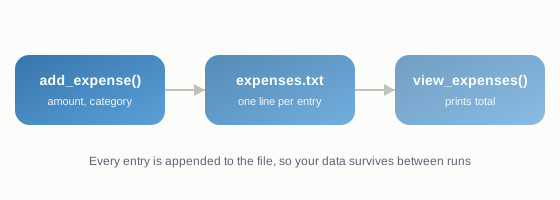
Knowing Python syntax and being able to build something are two different skills. This walkthrough closes that gap by building a simple, genuinely useful command-line Expense Tracker - the kind of small project you can put straight on your portfolio or GitHub.
What we're building
A program that lets you: add an expense with an amount and category, view all expenses, and see a total. We'll store the data in a text file so it's saved between runs.
Step 1: Set up your file
Create a file called expense_tracker.py and open it in any code editor (VS Code is a solid free choice).
Step 2: Write the core functions
import os

FILE_NAME = "expenses.txt"

def add_expense(amount, category):
    with open(FILE_NAME, "a") as f:
        f.write(f"{category},{amount}\n")
    print(f"Added: {category} - Rs.{amount}")

def view_expenses():
    if not os.path.exists(FILE_NAME):
        print("No expenses recorded yet.")
        return

    total = 0
    with open(FILE_NAME, "r") as f:
        for line in f:
            category, amount = line.strip().split(",")
            amount = float(amount)
            total += amount
            print(f"{category}: Rs.{amount}")

    print(f"\nTotal spent: Rs.{total}")
Step 3: Build a simple menu
def main():
    while True:
        print("\n1. Add expense")
        print("2. View expenses")
        print("3. Exit")
        choice = input("Choose an option: ")

        if choice == "1":
            category = input("Category (e.g. Food, Travel): ")
            amount = input("Amount: ")
            add_expense(amount, category)
        elif choice == "2":
            view_expenses()
        elif choice == "3":
            break
        else:
            print("Invalid option, try again.")

if __name__ == "__main__":
    main()
Step 4: Run it
Save the file and run python expense_tracker.py in your terminal. Add a few expenses, then view them - you should see each one listed along with a running total.
Step 5: Make it your own
Once this works, try extending it yourself: add a way to filter by category, add dates, or calculate monthly totals. These small additions are exactly what interviewers and freelance clients want to see - not a copy-pasted tutorial project, but one you've clearly understood and extended.