PHP powers a large share of the web - including WordPress, which alone runs over 40% of all websites. It's also one of the easiest languages to get running immediately, since most hosting providers (including the one this site runs on) support it out of the box, with no separate server setup required.
Your first PHP script
Create a file called hello.php and add:
<?php
  $name = "World";
  echo "Hello, " . $name . "!";
?>
Upload it to your hosting (or run it locally with a tool like XAMPP) and open it in a browser. You should see Hello, World! printed on the page.
Variables and echo
PHP variables always start with a $ sign, and you don't need to declare a type - PHP figures that out for you:
<?php
  $studentName = "Riya";
  $age = 21;
  echo $studentName . " is " . $age . " years old.";
?>
A slightly more useful example: a greeting form
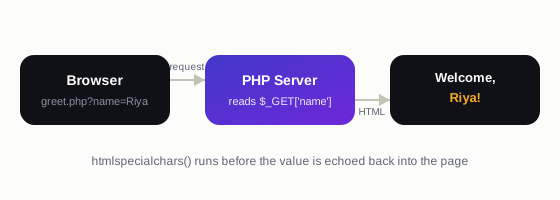
Here's a script that reads a name from the URL and greets the visitor by name - the same basic pattern used all over this site:
<?php
  $name = isset($_GET['name']) ? $_GET['name'] : 'Guest';
  echo "Welcome, " . htmlspecialchars($name) . "!";
?>
Save this as greet.php and visit greet.php?name=Riya in your browser - it should say "Welcome, Riya!". Notice the htmlspecialchars() call: it's good practice any time you print user input back to the page, since it prevents malicious code from being injected through the URL.
Where to go next
Once this feels comfortable, the natural next steps are: handling form submissions with $_POST, connecting to a MySQL database, and organizing your code with includes - all things you'll see used directly in the pages of this site.