"Must have Git experience" shows up on almost every developer job posting, yet a lot of learning resources make it sound far more complicated than it is. Here is the practical minimum you need to be productive.
What Git actually is
Git is a tool that saves snapshots of your project over time, so you can go back to any previous version, work on features without breaking your main code, and collaborate with others without overwriting each other's work. GitHub is simply a website that hosts your Git projects online.
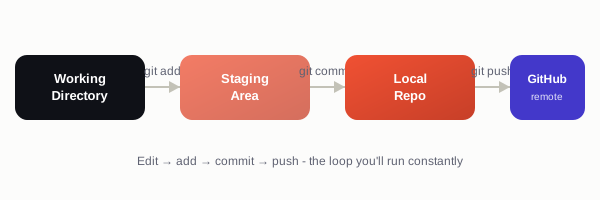
The four commands you will use constantly
git init                      # start tracking a project
git add .                     # stage your changes
git commit -m "Add login form" # save a snapshot with a message
git push                      # upload your commits to GitHub
That loop - edit files, add, commit, push - covers most of what you will do day to day.
Getting a project onto GitHub for the first time
git init
git add .
git commit -m "Initial commit"
git branch -M main
git remote add origin https://github.com/your-username/your-repo.git
git push -u origin main
After that first push, you only need git add, git commit, and git push for future changes.
Branches: working without fear
A branch lets you try something new without touching your working code. If it goes wrong, you simply delete the branch - your main project is untouched.
git checkout -b add-dark-mode   # create and switch to a new branch
# ... make changes, commit them ...
git checkout main               # switch back to main
git merge add-dark-mode         # bring the changes into main
Why this matters for your portfolio
Every project you build should live on GitHub with clear, regular commit messages - it doubles as proof to interviewers and freelance clients that you know how to work the way real teams do, not just that you can write code.