What Happens When Kafka Message Processing Fails?
In production, not every Kafka message will be processed successfully.
Database down, API timeout, bad JSON... anything can break your consumer.If you don't handle it, 2 bad things happen:
1. Data Loss: Message is gone forever
2. Infinite Retry: Consumer keeps failing and blocks the partitionThe solution: Dead Letter Queue - DLQ
What is DLQ in Kafka?
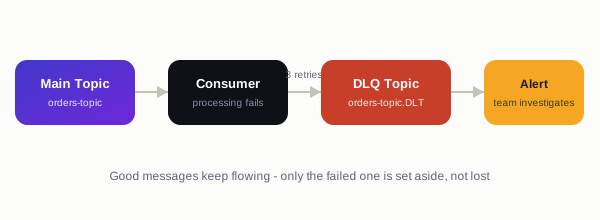
DLQ = Dead Letter Queue is just another Kafka topic.Flow:
Main Topic -> Consumer fails -> After X retries -> Send to DLQ Topic -> Alert teamThink of it like: "Failed Email" folder in Gmail. You don't delete it, you investigate later.
Why You Need DLQ in Java Spring Boot?
- No Data Loss: Failed messages are saved, not skipped
- Non-blocking: Main consumer keeps processing good messages
- Debugging: You can see exactly which message failed and why
- Replay: Fix the bug and replay messages from DLQ later
How to Implement DLQ in Java with Spring Kafka
Spring Kafka 2.8+ gives us DeadLetterPublishingRecoverer out of the box.
Step 1: Add Dependencies
spring-kafka
spring-boot-starter-web
Step 2: Config - Main Topic + DLQ Topic + Retry
Step 3: Java Config with Error Handler
Step 4: Consumer Code
Result: After 3 failures, this message automatically goes to orders-topic.DLT
Best Practices for DLQ in Production
1. Add Headers: Spring automatically adds exception, stacktrace, and original topic to DLQ message headers
2. Monitor DLQ: Set alert if DLQ size > 10. Use Prometheus + Grafana
3. Separate DLQ per Topic: Don't use 1 DLQ for all. Use orders-topic.DLT, payment-topic.DLT
4. Replay Tool: Build a small admin API to reprocess messages from DLQ after fixing bug
5. Don't Retry Forever: 3-5 retries is enough. Then DLQ.
Common Mistake
Bad: Catch exception and log it. Message is lost.
Good: Throw exception. Let Spring Kafka send it to DLQ.
Final Thought
DLQ is not optional in 2026. If you run Kafka in production, you must have DLQ.It’s the difference between "We lost 200 orders" vs "We have 200 orders in DLQ to fix".
Next Steps:
1. Implement the code above
2. Create a simple UI to view DLQ messages
3. Add Slack alert when message hits DLQ